 CapsPlan
Medikamente einnehmen, ohne es zu vergessen.
CapsPlan erinnert dich zuverlässig an jede Einnahme, behält deinen Vorrat im Blick und bewahrt deine gesamte Historie auf — komplett offline, ohne Konto, ohne Cloud. Mit Apple Watch, Siri, Widgets und Live Activities.
Never miss a dose again.
CapsPlan reliably reminds you of every intake, keeps your supply in view, and stores your entire history — fully offline, no account, no cloud. With Apple Watch, Siri, widgets and Live Activities.
So funktioniert's
Vier Ansichten. Alles, was du brauchst.
Keine überladenen Menüs, keine Lernkurve. CapsPlan konzentriert sich auf klare Ansichten, die genau das zeigen, was gerade wichtig ist.
How it works
Four views. Everything you need.
No cluttered menus, no learning curve. CapsPlan focuses on clear views that show exactly what matters right now.
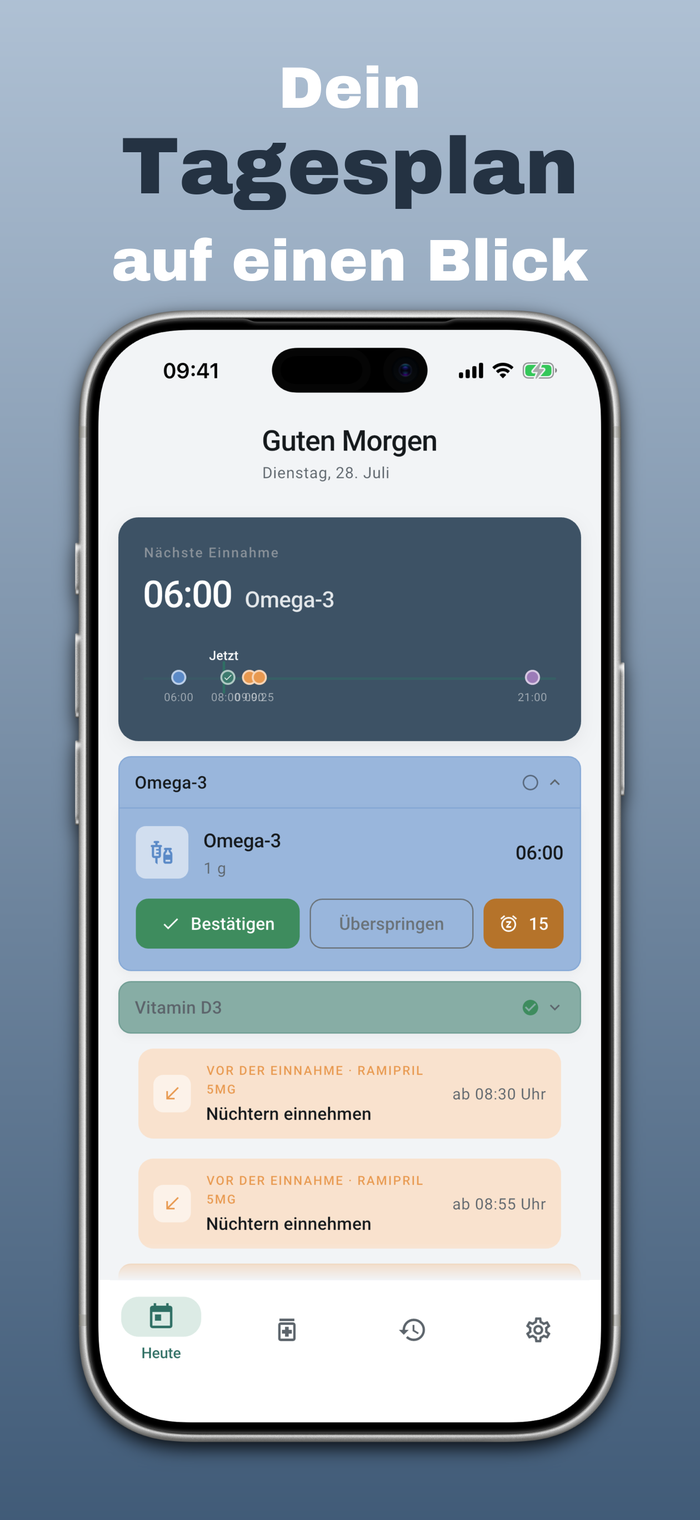
Dein Tagesplan auf einen Blick
Die Heute-Ansicht zeigt dir sofort, was als Nächstes fällig ist — mit einer visuellen Timeline über den ganzen Tag. Ein Fingertipp genügt, um eine Einnahme zu bestätigen, zu überspringen oder um 15 Minuten zu verschieben.
- Nächste Einnahme immer oben sichtbar
- Timeline zeigt bereits erledigte und offene Einnahmen
- Schnellaktionen: Bestätigen, Überspringen, Snooze
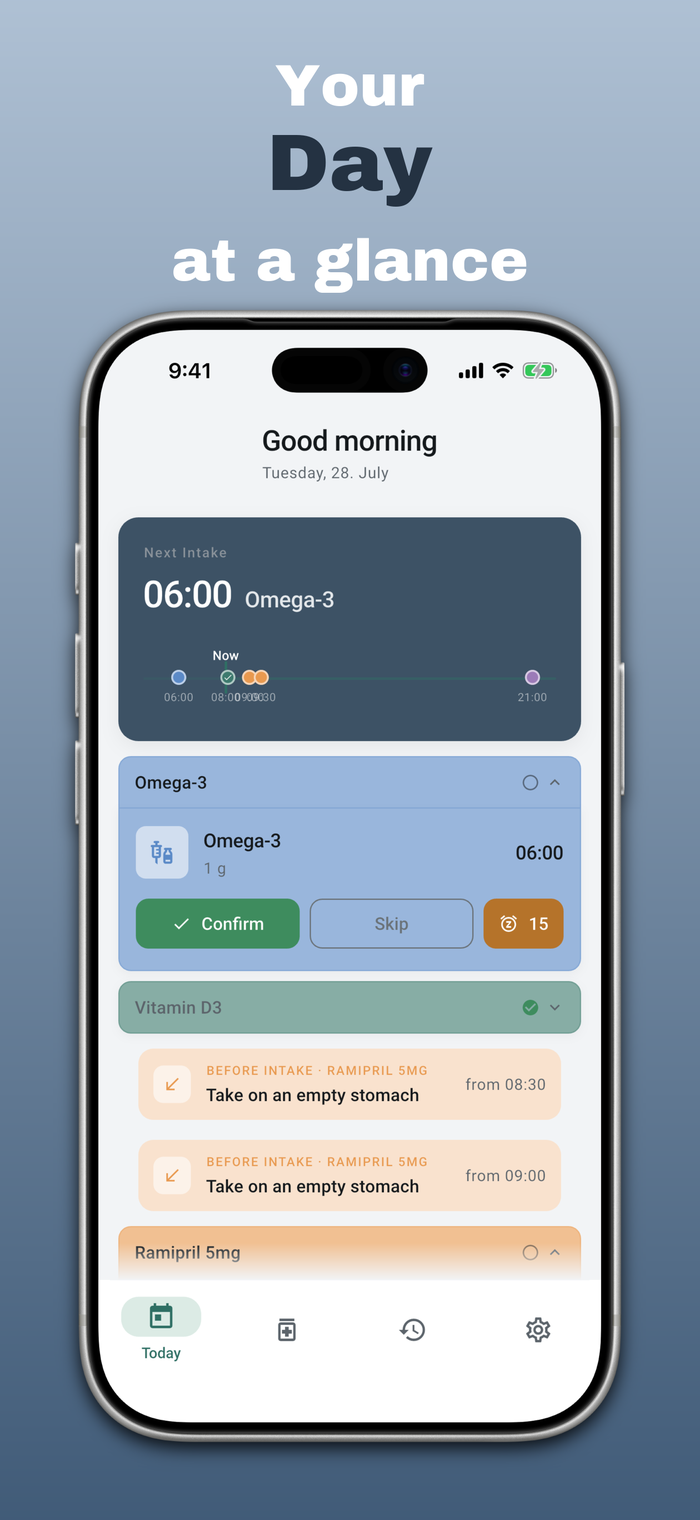
Your day, at a glance
The Today view instantly shows what's due next — with a visual timeline across your whole day. One tap is enough to confirm, skip, or snooze an intake by 15 minutes.
- Your next dose always visible at the top
- Timeline shows completed and open intakes
- Quick actions: confirm, skip, snooze
Medikationsplan einfach scannen
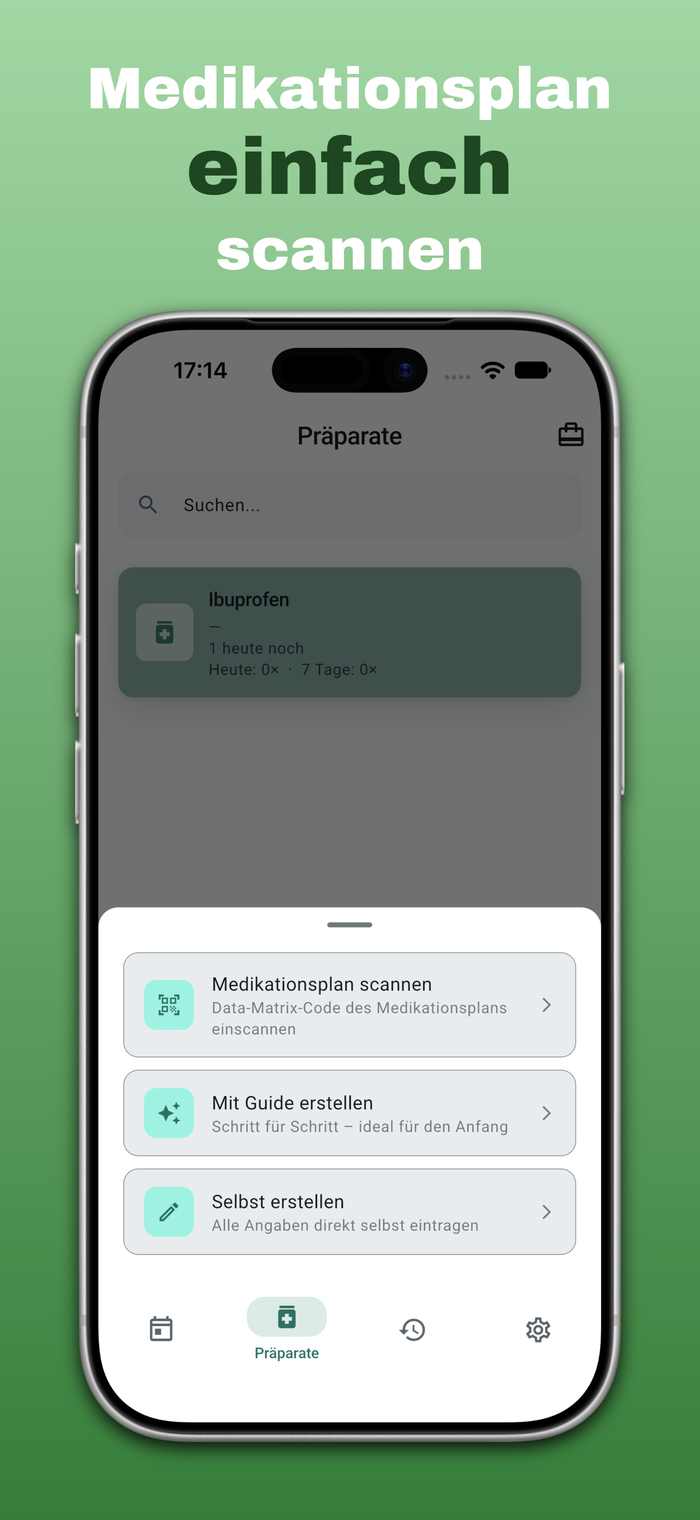
Kein manuelles Abtippen mehr: Scanne den Data-Matrix-Code deines bundeseinheitlichen Medikationsplans (BMP), und alle Präparate sind in Sekunden angelegt. Alles wird vor dem Speichern noch einmal zur Kontrolle angezeigt.
- Data-Matrix-Code des bundeseinheitlichen Medikationsplans einscannen
- Alternativ: geführter Guide für die manuelle Eingabe, Schritt für Schritt
- Oder komplett frei: alle Angaben selbst eintragen
Scan your medication plan
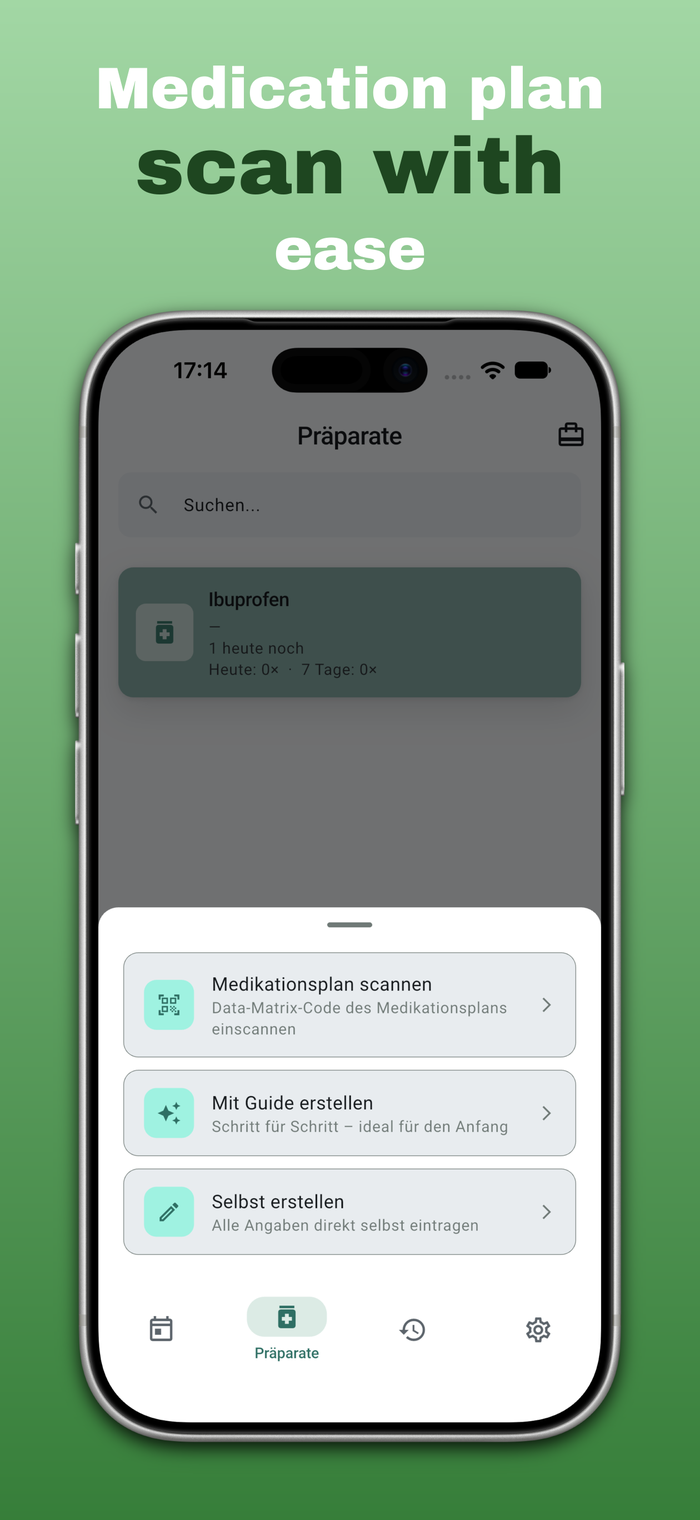
No more manual typing: scan the Data Matrix code of your standardized medication plan (the German "Medikationsplan"), and every medication is added in seconds. Everything is shown for review before it's saved.
- Scan the Data Matrix code of your standardized medication plan
- Or use the guided step-by-step assistant for manual entry
- Or enter everything yourself, completely free-form
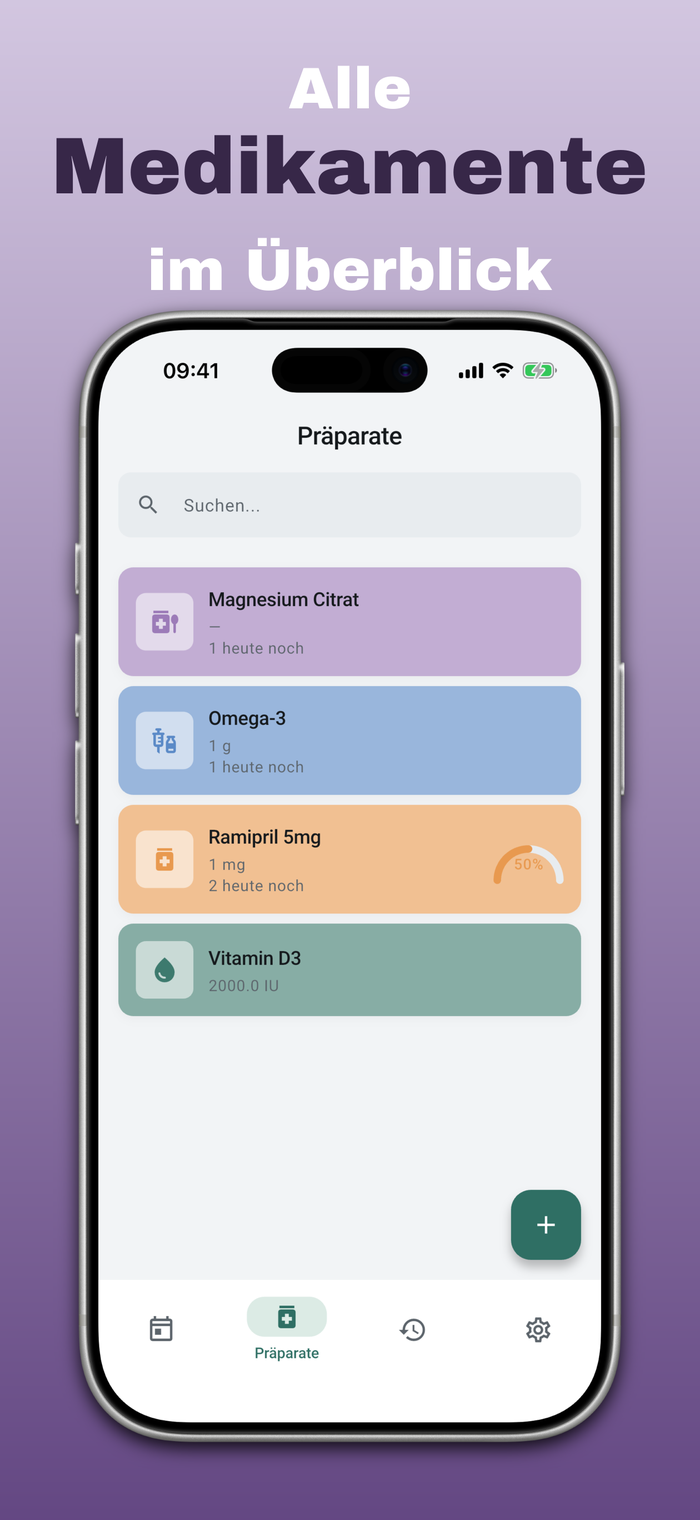
Alle Präparate übersichtlich verwaltet
Tabletten, Tropfen, Kapseln oder Spritzen — jedes Präparat bekommt eine eigene Karte mit Dosierung, Restmenge und einer eigenen Farbe zur schnellen Wiedererkennung.
- Beliebig viele Präparate mit individueller Dosierung
- Vorratsanzeige warnt, bevor eine Packung leer ist
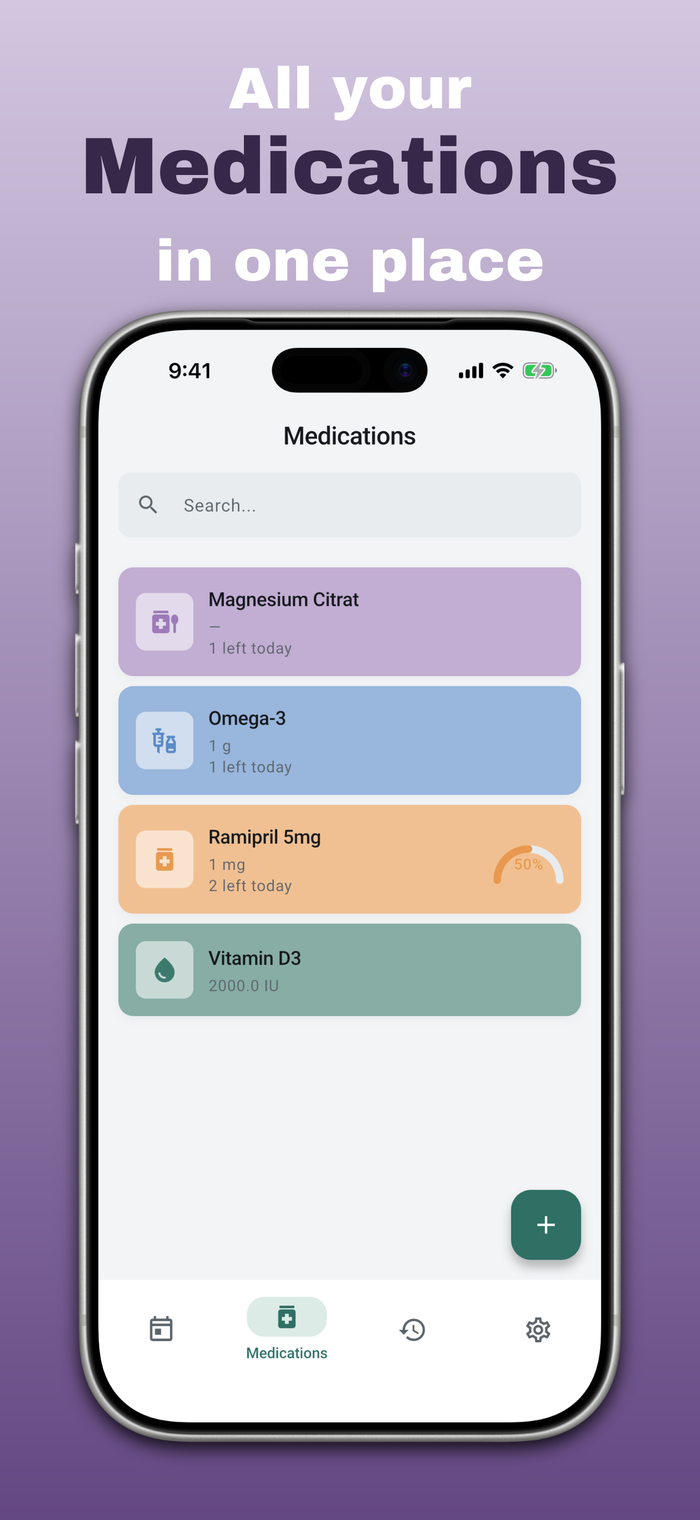
Every medication, organized
Tablets, drops, capsules, or injections — every medication gets its own card with dosage, remaining supply, and a distinct color for quick recognition.
- Any number of medications with individual dosing
- Supply indicator warns before a pack runs out
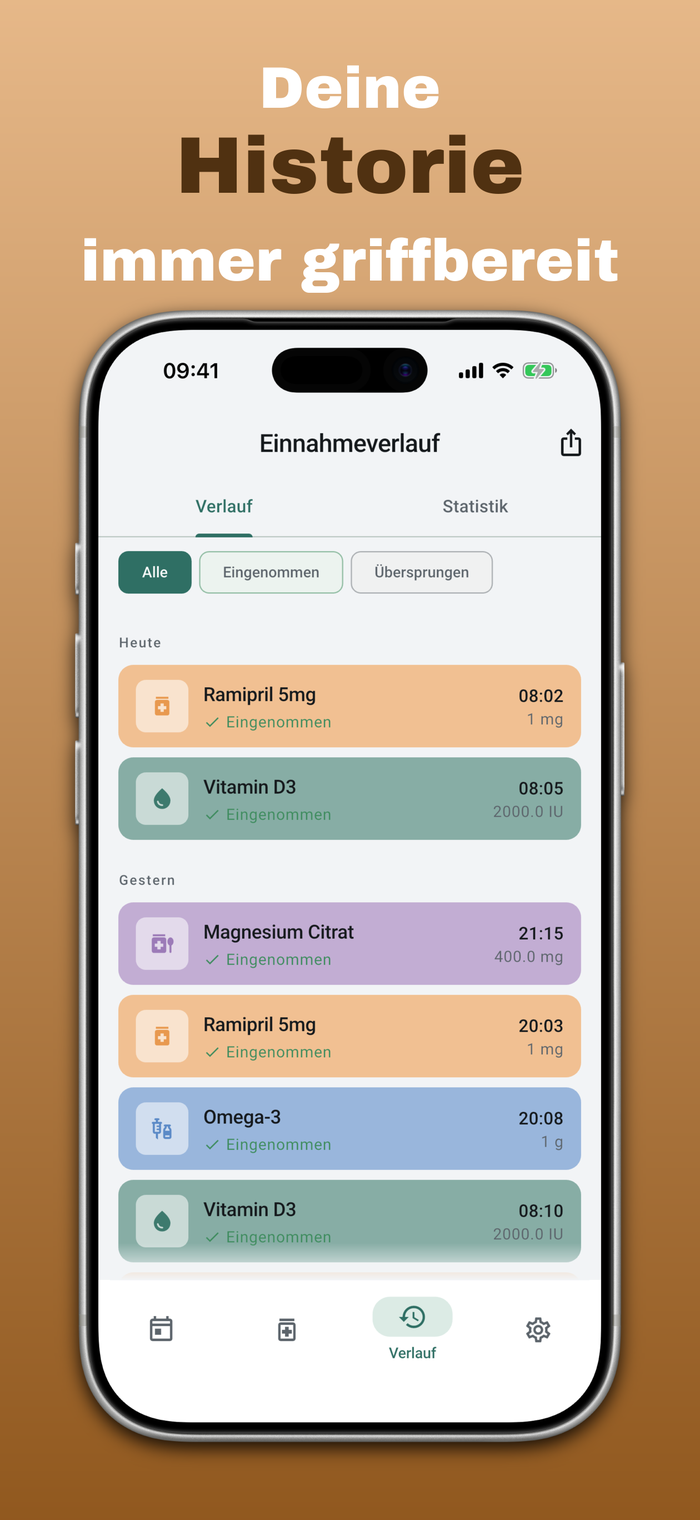
Deine Historie immer griffbereit
Jede Einnahme wird dokumentiert — eingenommen oder übersprungen. Perfekt, um beim nächsten Arztbesuch einen genauen Überblick zu geben oder die eigene Einnahmetreue als Statistik zu sehen.
- Vollständiger Verlauf, filterbar nach Präparat und Status
- Statistik-Ansicht für Einnahmetreue über Zeit
- CSV- & PDF-Export für den Arztbesuch (Premium)
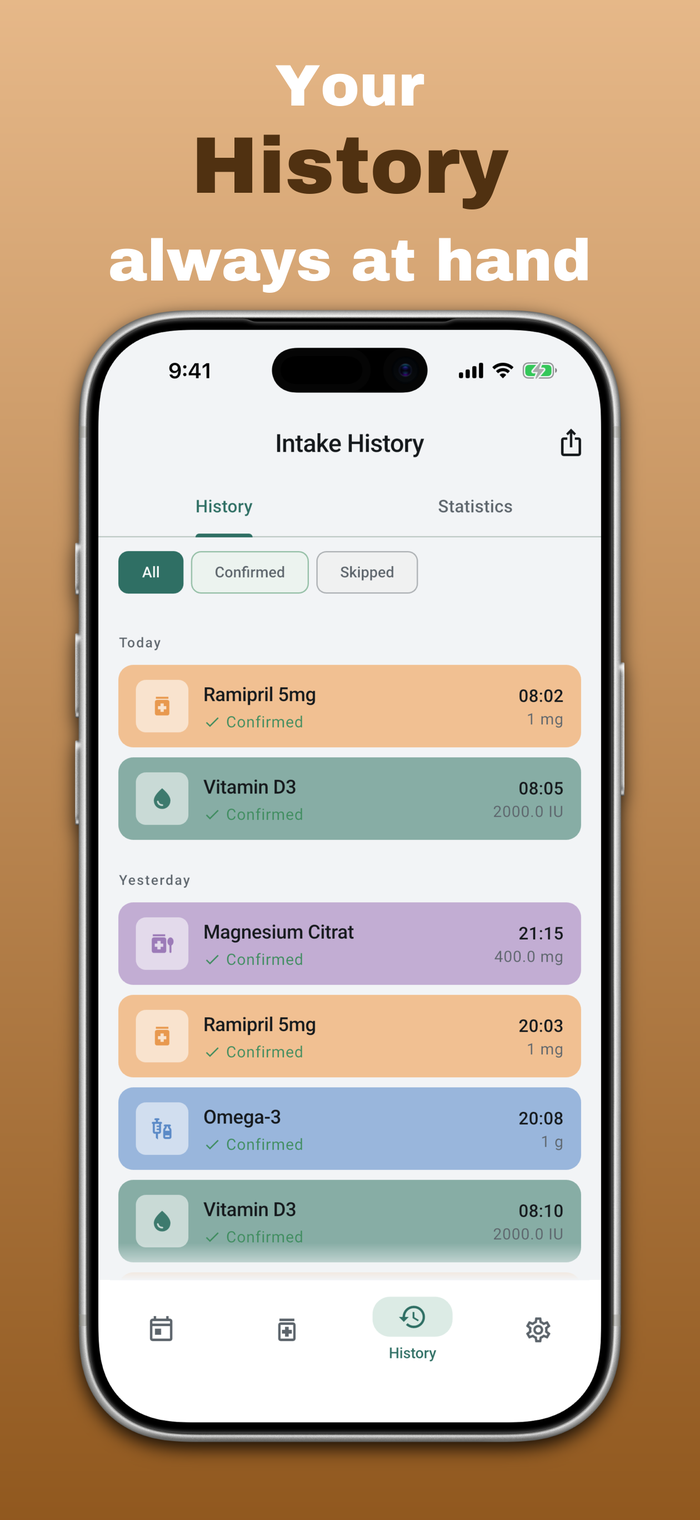
Your history, always at hand
Every intake is logged — taken or skipped. Perfect for giving your doctor a precise overview, or checking your own adherence as a statistic.
- Full history, filterable by medication and status
- Statistics view for adherence over time
- CSV & PDF export for doctor visits (Premium)
Funktionen
Alles für eine zuverlässige Routine.
CapsPlan bündelt genau die Funktionen, die eine Medikamenten-Routine wirklich braucht — ohne unnötigen Ballast.
Features
Everything for a reliable routine.
CapsPlan bundles exactly the features a medication routine actually needs — without unnecessary bloat.
Medikationsplan scannen
Den bundeseinheitlichen Medikationsplan (BMP) per Data-Matrix-Code scannen — alle Präparate sind in Sekunden angelegt, statt einzeln von Hand einzutragen.
Scan your medication plan
Scan the Data Matrix code of your standardized medication plan — every medication is added in seconds instead of typing each one by hand.
Intelligente Erinnerungen
Push-Benachrichtigungen genau zur Einnahmezeit, mit Schnellaktionen zum direkten Bestätigen oder Verschieben — ganz ohne die App zu öffnen.
Smart reminders
Push notifications right at intake time, with quick actions to confirm or snooze directly — no need to open the app.
Vorrat-Tracking Premium
Behalte im Blick, wie viele Tabletten oder Tropfen noch übrig sind, bevor der Vorrat unerwartet ausgeht.
Supply tracking Premium
Keep an eye on how many tablets or drops are left, before your supply unexpectedly runs out.
Komplett privat
Alle Daten bleiben ausschließlich auf deinem Gerät. Keine Cloud, kein Tracking, kein Konto, das du anlegen musst.
Completely private
All data stays exclusively on your device. No cloud, no tracking, no account required.
Homescreen-Widgets
iOS: Ringanzeige für den Tagesfortschritt und eine Variante ohne Medikamentennamen. Android: Widget zum Bestätigen und Überspringen direkt auf dem Homescreen.
Home screen widgets
iOS: a ring gauge for your daily progress and a variant that hides medication names. Android: a widget to confirm or skip right on your home screen.
Apple Watch
Einnahmen direkt auf der Uhr per Wisch bestätigen oder überspringen. Die Watch-App installierst du einmalig über die Watch-App auf dem iPhone.
Apple Watch
Confirm or skip doses right on your watch with a swipe. Install the watch app once via the Watch app on your iPhone.
Siri
„Hey Siri, nächste Einnahme bei CapsPlan“ — Siri nennt dir die nächste Einnahme oder bestätigt sie per Sprache.
Siri
“Hey Siri, next dose in CapsPlan” — Siri tells you your next intake or confirms it by voice.
Live Activities
Die nächste Einnahme auf dem Sperrbildschirm und in der Dynamic Island, mit Button zum Bestätigen.
Live Activities
Your next dose on the lock screen and in the Dynamic Island, with a confirm button.
Ein- und Ausschleichen
Dosis automatisch in festen Schritten senken oder erhöhen — bis 0 oder bis zu einer selbst gewählten Zieldosis. Ändert dein Arzt die Therapie, passt du den Plan jederzeit an.
Tapering up and down
Reduce or increase a dose automatically in fixed steps — to 0 or to a target dose you choose. If your doctor changes the therapy, you can adjust the plan at any time.
Reise & Zeitzonen
Zeitzone gewechselt? CapsPlan fragt, ob Erinnerungen zur Ortszeit wechseln. Dazu Vorratsrechner für die Reise und Ruhezeiten für Nachfass-Erinnerungen.
Travel & timezones
Changed timezone? CapsPlan asks whether reminders should follow local time. Plus a travel supply calculator and quiet hours for follow-up reminders.
Verlauf korrigieren
Vergangene Einnahmen nachträglich bearbeiten oder löschen, wenn beim Bestätigen etwas schiefging.
Correct your history
Edit or delete past intakes if something went wrong while confirming.
Mehrsprachig
Deutsch, Englisch, Spanisch, Italienisch und Türkisch — die App passt sich automatisch deiner Systemsprache an.
Multilingual
German, English, Spanish, Italian and Turkish — the app automatically adapts to your system language.
Für iOS & Android
Eine App, alle Geräte — dieselbe zuverlässige Erfahrung im App Store und bei Google Play.
For iOS & Android
One app, every device — the same reliable experience on the App Store and Google Play.
Export & Statistik Premium
Einnahmeverlauf als CSV oder PDF exportieren und die eigene Einnahmetreue als Statistik einsehen — praktisch für den nächsten Arztbesuch.
Export & statistics Premium
Export your intake history as CSV or PDF and view your own adherence as a statistic — handy for your next doctor's visit.
Privatsphäre
Privatsphäre ist kein Feature. Es ist die Grundlage.
CapsPlan wurde von Grund auf lokal gebaut. Alle Daten — Medikamente, Einnahmezeiten, Verlauf — werden ausschließlich mit einer lokalen Datenbank auf deinem Gerät gespeichert. Es gibt keine Server, die deine Gesundheitsdaten sehen, und kein Konto, das du anlegen musst.
Privacy
Privacy isn't a feature. It's the foundation.
CapsPlan was built local-first from day one. All data — medications, intake times, history — is stored exclusively in a local database on your device. There are no servers that ever see your health data, and no account you need to create.
- Keine Cloud-Synchronisation deiner Gesundheitsdaten No cloud sync of your health data
- Keine Werbe- oder Analyse-Tracker No advertising or analytics trackers
- Volle Kontrolle — App löschen heißt: Daten sind weg Full control — deleting the app means your data is gone
FAQ
Häufige Fragen
Die wichtigsten Antworten rund um CapsPlan — für alles andere gibt's die Support-Seite.
FAQ
Frequently asked questions
The most common answers about CapsPlan — for anything else, visit the support page.
Kommen meine Erinnerungen wirklich zuverlässig an? Will my reminders really arrive reliably?
Ja — solange Benachrichtigungen unter Einstellungen → CapsPlan → Benachrichtigungen erlaubt sind und der Nicht-stören-Modus deaktiviert ist. Alle Erinnerungen werden lokal auf dem Gerät geplant, unabhängig von einer Internetverbindung.
Yes — as long as notifications are allowed under Settings → CapsPlan → Notifications and Do Not Disturb is off. All reminders are scheduled locally on the device, independent of any internet connection.
Was passiert mit meinen Daten, wenn ich das Handy wechsle? What happens to my data when I switch phones?
CapsPlan speichert alle Daten ausschließlich lokal auf dem Gerät — es gibt kein Cloud-Backup. Bei einem Gerätewechsel oder einer Neuinstallation startet die App ohne vorherige Daten. Das ist der Preis für maximale Privatsphäre.
CapsPlan stores all data exclusively on-device — there is no cloud backup. Switching devices or reinstalling starts the app without previous data. That's the trade-off for maximum privacy.
Wie stelle ich meinen Premium-Kauf wieder her? How do I restore my Premium purchase?
Tippe in der App unter Einstellungen → Kauf wiederherstellen. Du musst mit derselben Apple-ID angemeldet sein, mit der der Kauf ursprünglich getätigt wurde.
Tap Settings → Restore Purchase inside the app. Make sure you're signed in with the same Apple ID used for the original purchase.
Ist CapsPlan kostenlos nutzbar? Can I use CapsPlan for free?
Ja. Kostenlos verwaltest du bis zu 2 Präparate mit 30 Tagen Verlauf, inklusive Erinnerungen, Präparate-Verwaltung und dem Scan des Medikationsplans. Premium schaltet unbegrenzte Präparate, den vollständigen Verlauf, Vorrat-Tracking und CSV-/PDF-Export für den Arzt frei — als monatliches oder jährliches Abo, jederzeit kündbar.
Yes. For free, you can manage up to 2 medications with 30 days of history, including reminders, medication management, and medication-plan scanning. Premium unlocks unlimited medications, full history, supply tracking, and CSV/PDF export for your doctor — as a monthly or yearly subscription, cancel anytime.
Kann ich meine Einnahmen exportieren, zum Beispiel für den Arzt? Can I export my intakes, for example for my doctor?
Ja. Im Verlauf tippst du oben auf das Teilen-Symbol und wählst einen Arztbericht als PDF, die CSV-Ereignisliste (eine Zeile pro Einnahme, Notiz oder Ausschleich-Ereignis) oder die CSV-Tagesmatrix (ein Tag pro Zeile, ein Medikament pro Spalte). Exportiert wird, was der Verlauf mit deinen aktuellen Filtern zeigt. Der Export ist ein Premium-Feature. Aufbau, Spalten und ein Beispiel zum Durchscrollen findest du auf der Seite zum Export. Export erklärt
Yes. In History, tap the share icon at the top and choose a doctor's report as PDF, the CSV event list (one row per intake, note or tapering event) or the CSV day matrix (one row per day, one column per medication). The export contains what History shows with your current filters. Export is a Premium feature. Structure, columns and an interactive example are on the export page. Export explained
Wie öffne ich die CSV-Datei aus CapsPlan in Excel? How do I open the CapsPlan CSV file in Excel?
Nicht doppelklicken, sondern in Excel Daten → Aus Text/CSV wählen, als Dateiursprung UTF-8 (65001) und als Trennzeichen Komma einstellen. Sonst werden Umlaute und die Zeichen ✓ ✗ ⏰ falsch angezeigt. Die Ereignisliste beginnt mit einer kurzen Zusammenfassung pro Präparat, gefolgt von einer Leerzeile und der eigentlichen Tabelle ab der Zeile „Datum,Uhrzeit,…“. Numbers und Google Sheets erkennen UTF-8 beim Import selbst. Export erklärt
Don't double-click. In Excel choose Data → From Text/CSV, set the file origin to UTF-8 (65001) and the delimiter to comma. Otherwise umlauts and the characters ✓ ✗ ⏰ display wrongly. The event list starts with a short summary per medication, then a blank line and the actual table from the line "Datum,Uhrzeit,…". Numbers and Google Sheets detect UTF-8 on import. Export explained
Was mache ich, wenn mein Arzt die Dosis oder die Therapie ändert? What do I do if my doctor changes the dose or the therapy?
Öffne das Präparat und passe Dosis und Einnahmezeiten an, die Erinnerungen ziehen automatisch nach. Läuft ein Ein- oder Ausschleichplan, änderst du ihn direkt im Plan: Phasen ergänzen, Schrittweite oder Dauer ändern, die Richtung wechseln oder die aktuelle Dosis setzen. Bereits dokumentierte Einnahmen bleiben unverändert im Verlauf.
Open the medication and adjust the dose and intake times; reminders follow automatically. If a taper plan is running, change it in the plan itself: add phases, change step size or duration, switch direction or set the current dose. Intakes already documented stay unchanged in your history.
Ersetzt CapsPlan eine ärztliche Beratung? Does CapsPlan replace medical advice?
Nein. CapsPlan ist eine Organisationshilfe für die Einnahme deiner Medikamente. Die App ersetzt keine ärztliche Beratung — bei Fragen zu Dosierung oder Wechselwirkungen wende dich immer an eine Ärztin, einen Arzt oder deine Apotheke.
No. CapsPlan is an organizational aid for taking your medications. It does not replace medical advice — always consult a doctor or pharmacist about dosage or interaction questions.
Kann ich eine neue Funktion vorschlagen? Can I suggest a new feature?
Immer gerne — schreib einfach eine E-Mail an support@dxdotm-coding.com. Vorschläge fließen direkt in die Weiterentwicklung der App ein.
Always welcome — just send an email to support@dxdotm-coding.com. Suggestions go directly into future development of the app.
Wie installiere ich CapsPlan auf der Apple Watch? How do I install CapsPlan on my Apple Watch?
CapsPlan wird nicht automatisch auf die Uhr übertragen. Öffne die Watch-App auf dem iPhone, wechsle zu „Meine Uhr“, scrolle zu „Verfügbare Apps“ und tippe bei CapsPlan auf „Installieren“. Auf der Uhr bestätigst du Einnahmen mit einer Wisch-Geste nach rechts oder überspringst sie nach links.
CapsPlan isn't installed on the watch automatically. Open the Watch app on your iPhone, go to “My Watch”, scroll to “Available Apps” and tap Install next to CapsPlan. On the watch, swipe a dose right to confirm it or left to skip it.
Was kann ich Siri zu CapsPlan sagen? What can I say to Siri about CapsPlan?
Zum Beispiel „Hey Siri, nächste Einnahme bei CapsPlan“, um deine nächste Einnahme zu erfahren, oder „Einnahme bestätigen bei CapsPlan“, um sie per Sprache zu bestätigen. Das funktioniert auf dem iPhone, ohne dass du die App öffnen musst.
For example “Hey Siri, next dose in CapsPlan” to hear your next intake, or “Confirm my dose in CapsPlan” to confirm it by voice. It works on iPhone without opening the app.
Kann CapsPlan ein Ein- oder Ausschleichen planen? Can CapsPlan plan tapering up or down?
Ja, beides. Beim Ausschleichen senkst du eine Dosis schrittweise, bis 0 oder bis zu einer Zieldosis. Beim Einschleichen erhöhst du sie schrittweise bis zur Zieldosis. Du legst Start, Schrittweite und Intervall fest, CapsPlan berechnet die jeweilige Dosis und erinnert daran. Ändert dein Arzt die Therapie, kannst du den Plan jederzeit anpassen: Phasen hinzufügen oder ändern, die Richtung wechseln, Startdatum und aktuelle Dosis korrigieren, auch mit unterschiedlicher Dosis pro Uhrzeit. Die Dosierung legt immer dein Arzt fest. Ein- und Ausschleichen erklärt
Yes, both. When tapering down you reduce a dose step by step, to 0 or to a target dose. When tapering up you increase it step by step to the target dose. You set the start, step size and interval; CapsPlan calculates each dose and reminds you. If your doctor changes the therapy, you can adjust the plan at any time: add or change phases, switch direction, correct the start date and current dose, even with a different dose per time of day. Your doctor always determines the dosage. Tapering explained
Ratgeber
Kurz erklärt.
Guides
Explained briefly.
Medikamenten-App ohne Konto
Viele Medikamenten-Apps verlangen ein Konto und speichern Gesundheitsdaten in der Cloud. CapsPlan arbeitet komplett lokal: keine Registrierung, keine Server, alle Daten bleiben auf deinem Gerät (auf iOS optional mit Backup in deiner eigenen iCloud).
Medication app without an account
Many medication apps require an account and keep health data in the cloud. CapsPlan works entirely locally: no sign-up, no servers, all data stays on your device (on iOS optionally backed up to your own iCloud).
Ein- und Ausschleichplan in der App planen
Wird ein Medikament schrittweise gesenkt oder erhöht (nach ärztlicher Anweisung), wählst du Ausschleichen oder Einschleichen und legst Start, Schrittweite und Intervall fest. CapsPlan berechnet die Tagesdosis, erinnert daran und endet bei der Zieldosis. Ändert sich die Therapie, passt du den Plan jederzeit an. Die Dosierung legt immer dein Arzt fest.
Planning a taper up or down in the app
If a medication is reduced or increased step by step (as directed by your doctor), you choose Taper down or Taper up and set start, step size and interval. CapsPlan calculates the daily dose, reminds you, and ends at the target dose. If the therapy changes, you adjust the plan at any time. Your doctor always determines the dosage.
Medikamentenvorrat für die Reise berechnen
Reisezeitraum wählen — CapsPlan zeigt pro Präparat, wie viele Tabletten, Tropfen oder Einheiten du einpacken solltest. So hast du auch bei Verspätungen genug dabei.
Calculating your medication supply for a trip
Pick your travel dates — CapsPlan shows, per medication, how many tablets, drops or units to pack, so you have enough even if your trip runs late.
Bereit, deine Einnahmen nie wieder zu vergessen?
Kostenlos starten, jederzeit auf Premium upgraden.
Ready to never miss a dose again?
Start for free, upgrade to Premium anytime.