 CapsPlan
Export & DatenExport & data
Deine Einnahmen als Tabelle, die dein Arzt lesen kann.Your intakes as a table your doctor can read.
CapsPlan exportiert deinen Verlauf als CSV für Excel & Co. oder als PDF-Arztbericht. Hier siehst du, wie diese Dateien aufgebaut sind, an einem vier Monate langen Beispiel zum Durchscrollen. Alle Daten sind erfunden und mit dem echten Export-Code der App erzeugt.CapsPlan exports your history as CSV for Excel & co. or as a PDF doctor's report. Here is how these files are built, using a four-month example you can scroll through. All data is fictional and was generated with the app's real export code.
Drei Formate, drei ZweckeThree formats, three purposes
Im Verlauf tippst du oben auf das Teilen-Symbol und wählst das Format. Der Export ist ein Premium-Feature und enthält genau das, was du im Verlauf mit den aktuellen Filtern siehst.In History, tap the share icon at the top and pick a format. Export is a Premium feature and contains exactly what History shows with your current filters.
EreignislisteEvent list
Eine Zeile pro Einnahme, Notiz oder Ausschleich-Ereignis. Ideal für eigene Auswertungen, Pivot-Tabellen oder Skripte.One row per intake, note or tapering event. Ideal for your own analysis, pivot tables or scripts.
capsplan_YYYYMMDD.csv
TagesmatrixDay matrix
Eine Zeile pro Kalendertag, eine Spalte pro Medikament mit ✓ / ✗ / ⏰. Auf einen Blick lesbar, sehr übersichtlich in Excel.One row per calendar day, one column per medication with ✓ / ✗ / ⏰. Readable at a glance, very clear in Excel.
capsplan_YYYYMMDD_matrix.csv
ArztberichtDoctor's report
Übersicht mit Einnahmetreue, eine Tabelle pro Präparat mit den tatsächlichen Einnahmezeiten und eine Notizen-Seite. Zum Ausdrucken oder Mailen.Overview with adherence, one table per medication with the actual intake times and a notes page. For printing or emailing.
capsplan_bericht_YYYYMMDD.pdf
Das Beispiel: Anna und ihre TherapieThe example: Anna and her therapy
Anna (fiktiv, 38) hat seit drei Jahren eine Myasthenia gravis. Sie nimmt ihre Medikamente seit dem 1. Juni mit CapsPlan. Am 26. September exportiert sie alles für den Kontrolltermin beim Neurologen.Anna (fictional, 38) has had myasthenia gravis for three years. She has been logging her medication in CapsPlan since June 1. On September 26 she exports everything for her check-up with the neurologist.
Feste EinnahmenScheduled intakes
Bei BedarfAs needed
Was in diesen Monaten passiertWhat happens in these months
- Meist im Rhythmus, manchmal eine Stunde zu spät oder zu früh.Mostly on schedule, sometimes an hour late or early.
- Ein Städtetrip bringt die Routine durcheinander.A city trip disrupts the routine.
- Migräne-Tage, ein Infekt, eine Impfung.Migraine days, an infection, a vaccination.
- Notizen zu Symptomen und Arztterminen.Notes on symptoms and doctor visits.
Erleben: dein Verlauf als DateiExplore: your history as a file
Tippe auf einen Tag im Kalender oder folge der Führung. Die Tabelle darunter ist die echte Datei, nichts ist nachgebaut.Tap a day in the calendar or follow the guided tour. The table below is the real file, nothing is mocked up. The notes are in German, as the fictional user wrote them.
Pro Tag eine Zeile, pro Medikament eine Spalte. Mehrere Einnahmen am Tag stehen in einer Zelle, getrennt durch Semikolon.One row per day, one column per medication. Several intakes on a day share one cell, separated by semicolons.
Das PDF (22 Seiten in diesem Beispiel) beginnt mit einer Übersicht, dann folgt pro Präparat eine Tabelle. Hier vier Seiten daraus. Tippe auf eine Seite, um sie groß zu sehen.The PDF (22 pages in this example) starts with an overview, followed by one table per medication. Here are four pages. Tap a page to enlarge it.
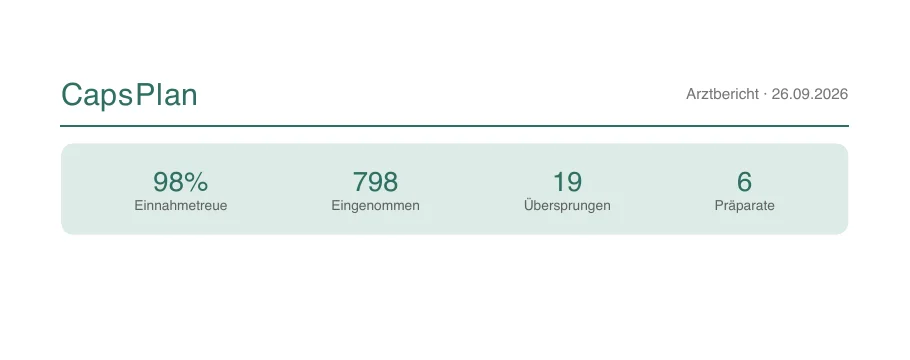
Einnahmetreue, eingenommen, übersprungen, Anzahl Präparate.Adherence, taken, skipped, number of medications.
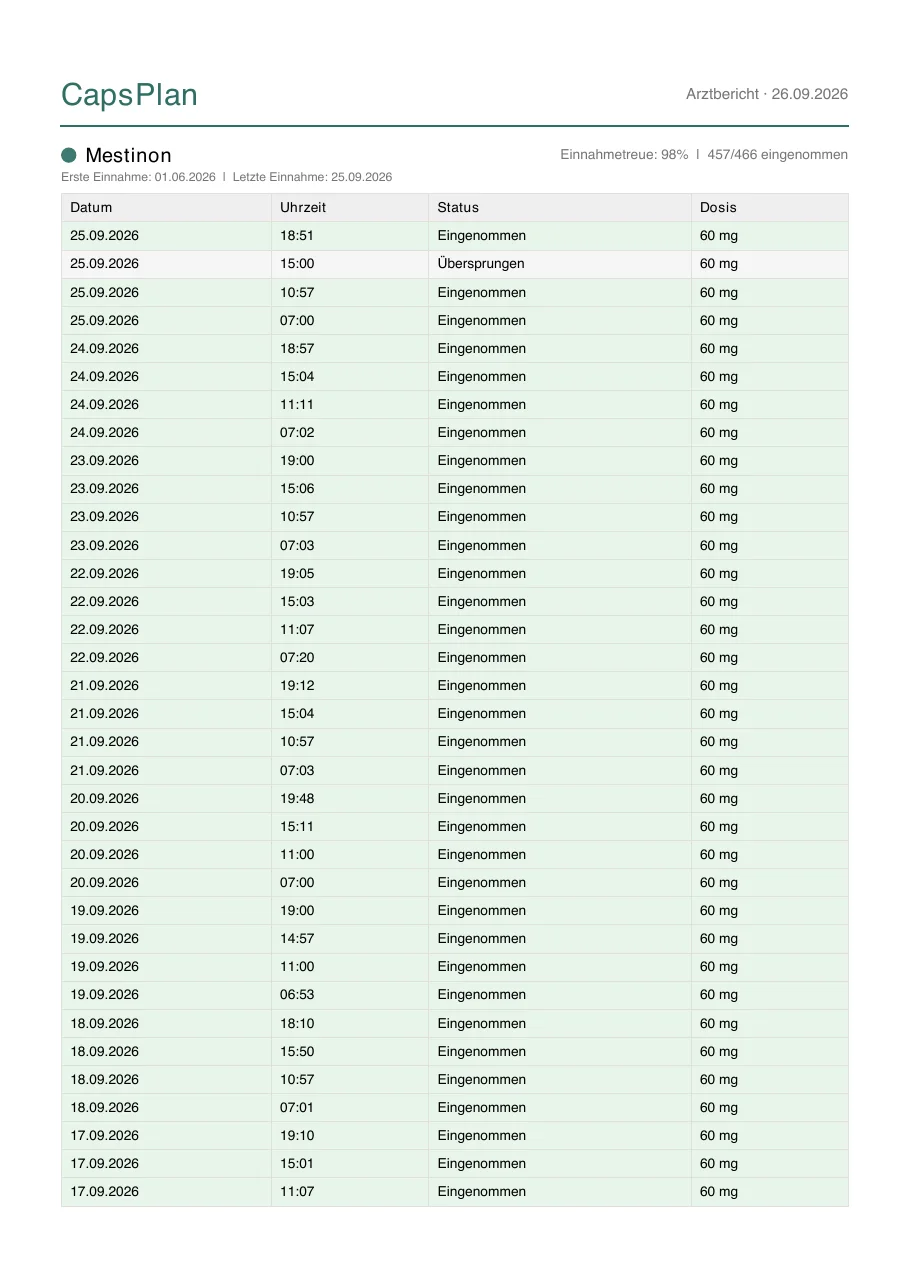
Mit den tatsächlichen Uhrzeiten: 19:04 statt 19:00, verspätet oder verfrüht ist sichtbar.With the actual times: 19:04 instead of 19:00, so late or early intakes show.
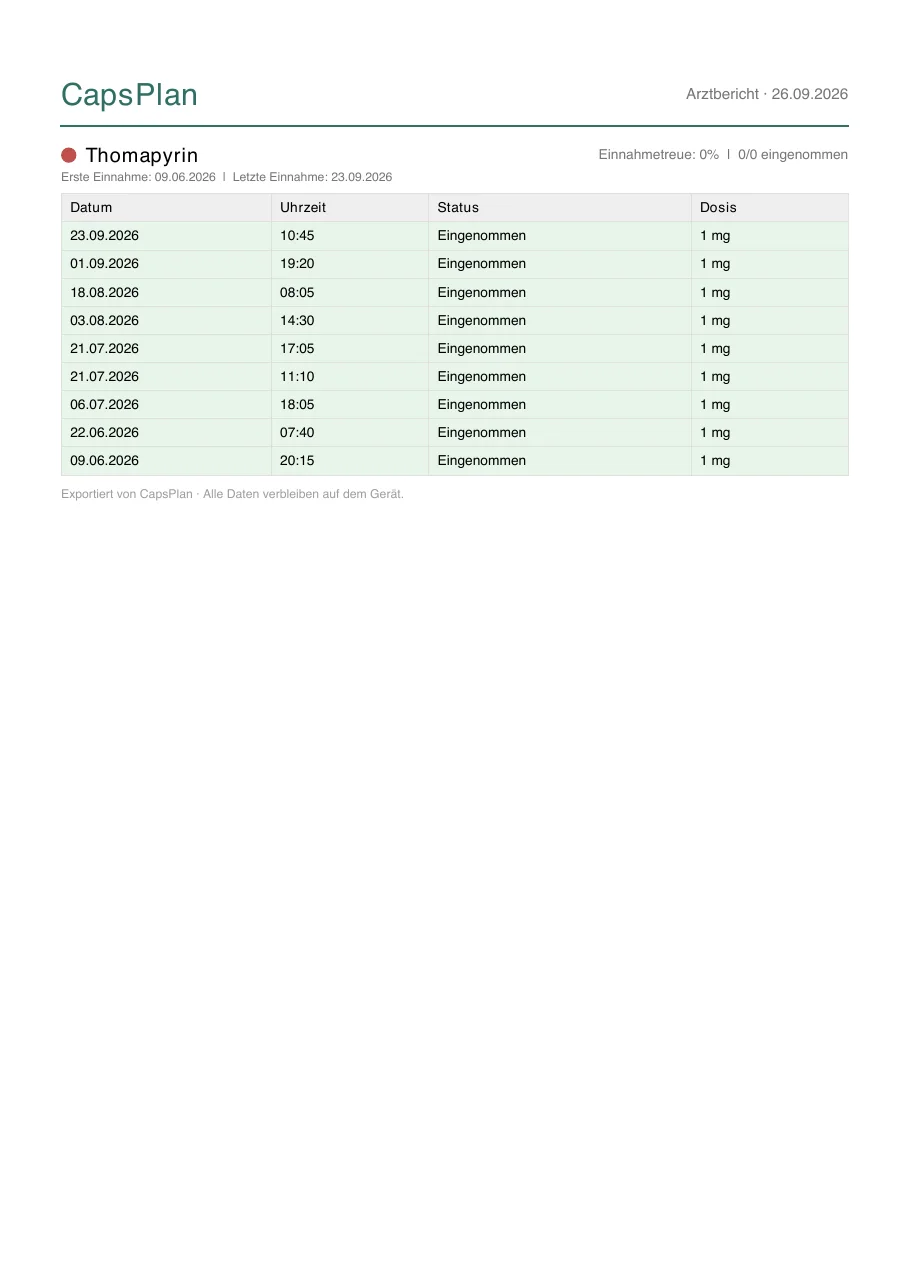
Bedarfsmedikation hat nur den Zeitpunkt der Einnahme.As-needed medication only has the time it was taken.
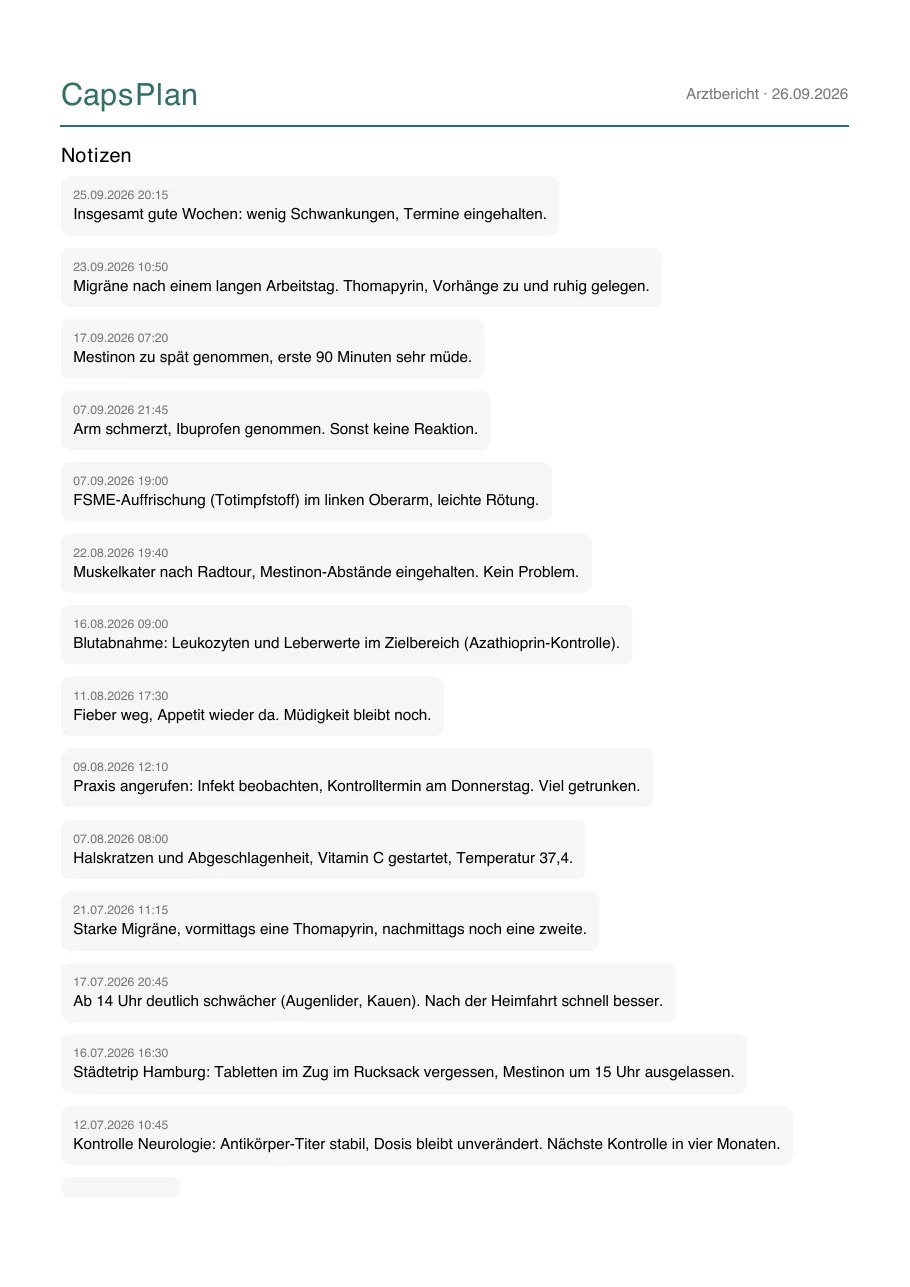
Alle Verlaufsnotizen des Zeitraums, neueste zuerst.All history notes of the period, newest first.
Dokumentation der FormateFormat documentation
Für alle, die die Dateien weiterverarbeiten wollen. Stand: CapsPlan 1.9.For anyone who wants to process the files further. As of CapsPlan 1.9.
Grundlagen (gilt für beide CSV-Dateien)
- Kodierung UTF-8, Trennzeichen Komma, Zeilenende
\n, Felder mit Komma, Anführungszeichen oder Zeilenumbruch stehen in"…"(RFC 4180). - Datum
YYYY-MM-DD, UhrzeitHH:mmin der lokalen Zeit des Geräts, ohne Zeitzone. Zahlen mit Punkt als Dezimaltrenner. - Die Spaltenüberschriften sind deutsch, die Werte in
TypundStatussind englische Schlüsselwörter und stabil. - Sortierung: neueste Einträge zuerst. Die Datei enthält, was im Verlauf mit den aktuellen Filtern angezeigt wird (Präparat, Status, Zeitraum).
Ereignisliste: Aufbau
Die Datei beginnt mit einem kurzen Zusammenfassungs-Block (eine Zeile pro Präparat), dann eine Leerzeile, dann die eigentliche Tabelle.
Präparat,Erste dokumentierte Einnahme,Letzte dokumentierte Einnahme,Ausschleichen gestartet,Ausschleichen abgeschlossen
Mestinon,2026-06-01,2026-09-25,,

Datum,Uhrzeit,Medikament,Typ,Dosis,Status,Notiz
2026-09-25,15:00,Mestinon,tablet,60,skipped,
2026-09-23,10:50,,,,note,"Migräne nach einem langen Arbeitstag. …"
| Spalte | Bedeutung |
|---|---|
Datum, Uhrzeit | Bei geplanten Einnahmen die geplante Zeit (auch wenn später bestätigt wurde). Bei Bedarfsmedikation der Zeitpunkt der Einnahme. Bei Notizen die Erstellzeit. Bei Ausschleich-Ereignissen ist die Uhrzeit leer. |
Medikament | Name des Präparats. Leer bei Notizen. |
Typ | tablet, liquid, drops, capsule, injection, patch, inhaler, powder |
Dosis | Tatsächlich eingenommene Menge als Zahl, in der Einheit des Präparats (z. B. mg). Die Einheit steht nicht in der Datei. |
Status | confirmed (eingenommen), skipped (übersprungen), snoozed (verschoben und nicht mehr bestätigt), pending (offen), note (Notiz), tapering_started / tapering_completed (Ausschleichen gestartet / abgeschlossen) |
Notiz | Freitext der Verlaufsnotiz, nur bei note. |
Tagesmatrix: Aufbau
Datum,Mestinon,Azathioprin,Vitamin D3 + K2,Thomapyrin,Ibuprofen,Vitamin C,Notizen
2026-06-02,19:00 ✓; 15:00 ✓; 11:00 ✓; 07:00 ✓,20:00 ✓; 08:00 ✓,08:00 ✓,,,,"Abends ab ca. 19 Uhr Doppelbilder…"
- Eine Zeile pro Kalendertag vom ersten bis zum letzten Eintrag, auch Tage ohne Eintrag.
- Pro Medikament eine Spalte. Zelle:
HH:mm ✓eingenommen,HH:mm ✗übersprungen,HH:mm ⏰verschoben,HH:mm …offen. Mehrere Einträge am Tag mit;getrennt. Zeiten sind die geplanten Zeiten. - Die Spalte
Notizenfasst alle Notizen des Tages mit|zusammen. Ausschleich-Ereignisse stehen als Text in der Zelle des Präparats.
Arztbericht (PDF): Aufbau
- Seite 1: Übersicht mit Einnahmetreue (eingenommen ÷ eingenommen + übersprungen), Anzahl eingenommen, übersprungen und Präparate.
- Danach pro Präparat eine Tabelle mit Datum, Uhrzeit, Status, Dosis. Bei eingenommenen Dosen steht die tatsächliche Uhrzeit, bei übersprungenen die geplante. Erste und letzte Einnahme und ein eventuelles Ausschleichen stehen unter dem Namen.
- Zum Schluss eine Seite mit allen Notizen (nur wenn welche im Zeitraum liegen).
- Bedarfsmedikation ist dabei, hat aber keine geplante Zeit und zählt nicht in die Einnahmetreue.
Wichtige Hinweise und Grenzen
- Verspätet oder verfrüht: Die CSV-Dateien enthalten nur die geplante Zeit. Die tatsächliche Zeit einer Bestätigung steht nur im PDF.
- Notizen sind nur im Export, wenn im Verlauf weder ein Präparat noch ein Status gefiltert ist.
- Ausschleich-Zeilen fehlen, sobald ein Statusfilter aktiv ist.
- Premium: Der Export ist Premium vorbehalten. Ohne Premium zeigt der Verlauf nur die letzten 30 Tage.
- Das PDF nutzt die Standardschrift des PDF-Formats und stellt nur westeuropäische Zeichen sicher dar.
CSV in Excel, Numbers oder Google Sheets öffnen
- Excel: nicht doppelklicken, sondern Daten → Aus Text/CSV, Dateiursprung 65001: Unicode (UTF-8), Trennzeichen Komma. Sonst werden Umlaute und ✓ ✗ ⏰ falsch angezeigt. Deutsche Excel-Versionen erwarten sonst Semikolon.
- Numbers / Google Sheets: öffnen und importieren, UTF-8 wird erkannt.
- Die Ereignisliste hat einen Zusammenfassungs-Block oben. Beim Import ab Zeile Datum,Uhrzeit,… beginnen (im Beispiel Zeile 9).
import pandas as pd
df = pd.read_csv("capsplan.csv", skiprows=8)      # Zusammenfassung und Leerzeile überspringen
df = df[df["Status"] == "skipped"]                # z. B. alle übersprungenen Dosen
print(df.groupby("Medikament").size())
Basics (both CSV files)
- UTF-8 encoding, comma separator, line ending
\n, fields containing a comma, quote or line break are wrapped in"…"(RFC 4180). - Date
YYYY-MM-DD, timeHH:mmin the device's local time, no time zone. Numbers use a dot as decimal separator. - Column headers are in German. The values in
Typ(type) andStatusare stable English keywords. - Sorted newest first. The file contains what History shows with your current filters (medication, status, period).
Event list: structure
The file starts with a short summary block (one row per medication), then a blank line, then the actual table.
Präparat,Erste dokumentierte Einnahme,Letzte dokumentierte Einnahme,Ausschleichen gestartet,Ausschleichen abgeschlossen
Mestinon,2026-06-01,2026-09-25,,

Datum,Uhrzeit,Medikament,Typ,Dosis,Status,Notiz
2026-09-25,15:00,Mestinon,tablet,60,skipped,
2026-09-23,10:50,,,,note,"Migraine after a long working day. …"
| Column | Meaning |
|---|---|
Datum, Uhrzeit | For scheduled intakes the planned time (even if confirmed later). For as-needed medication the time it was taken. For notes the creation time. Empty time for tapering events. |
Medikament | Medication name. Empty for notes. |
Typ | tablet, liquid, drops, capsule, injection, patch, inhaler, powder |
Dosis | Amount actually taken as a number, in the medication's own unit (e.g. mg). The unit is not in the file. |
Status | confirmed, skipped, snoozed (postponed and never confirmed), pending (open), note, tapering_started / tapering_completed |
Notiz | Free text of the history note, only for note. |
Day matrix: structure
Datum,Mestinon,Azathioprin,Vitamin D3 + K2,Thomapyrin,Ibuprofen,Vitamin C,Notizen
2026-06-02,19:00 ✓; 15:00 ✓; 11:00 ✓; 07:00 ✓,20:00 ✓; 08:00 ✓,08:00 ✓,,,,"…"
- One row per calendar day from the first to the last entry, including days without entries.
- One column per medication. Cell:
HH:mm ✓taken,HH:mm ✗skipped,HH:mm ⏰snoozed,HH:mm …open. Several entries per day are joined with;. Times are the planned times. - The
Notizen(notes) column joins all notes of the day with|. Tapering events appear as text in the medication's cell.
Doctor's report (PDF): structure
- Page 1: overview with adherence (taken ÷ taken + skipped), counts of taken, skipped and medications.
- Then one table per medication with date, time, status, dose. For taken doses the actual time is shown, for skipped ones the planned time. First and last intake and any tapering are shown under the name.
- A final page lists all notes (only if there are any in the period).
- As-needed medication is included, but has no planned time and does not count towards adherence.
Important notes and limits
- Late or early: the CSV files only contain the planned time. The actual time of a confirmation is only in the PDF.
- Notes are only exported when History is not filtered by medication or status.
- Tapering rows are omitted while a status filter is active.
- Premium: export requires Premium. Without it, History shows the last 30 days only.
- The PDF uses the standard PDF font and only reliably displays Western European characters.
Opening the CSV in Excel, Numbers or Google Sheets
- Excel: don't double-click. Use Data → From Text/CSV, file origin 65001: Unicode (UTF-8), delimiter comma. Otherwise umlauts and ✓ ✗ ⏰ display wrongly. Some regional Excel versions expect semicolons.
- Numbers / Google Sheets: open and import, UTF-8 is detected.
- The event list starts with a summary block. When importing, start at the line Datum,Uhrzeit,… (line 9 in the example).
import pandas as pd
df = pd.read_csv("capsplan.csv", skiprows=8)      # skip summary block and blank line
df = df[df["Status"] == "skipped"]                # e.g. all skipped doses
print(df.groupby("Medikament").size())