 CapsPlan
Never miss a dose again.
CapsPlan is the medication reminder that fits your day: confirm doses with a swipe on Apple Watch or with Siri, keep your supply in view, split tablets with a suggested breakdown, and follow tapering plans. Offline, no account, no servers of ours – with optional iCloud sync and Home Assistant. Download free for iPhone and Android now.
How it works
Four views. Everything you need.
No cluttered menus, no learning curve. CapsPlan focuses on clear views that show exactly what matters right now.
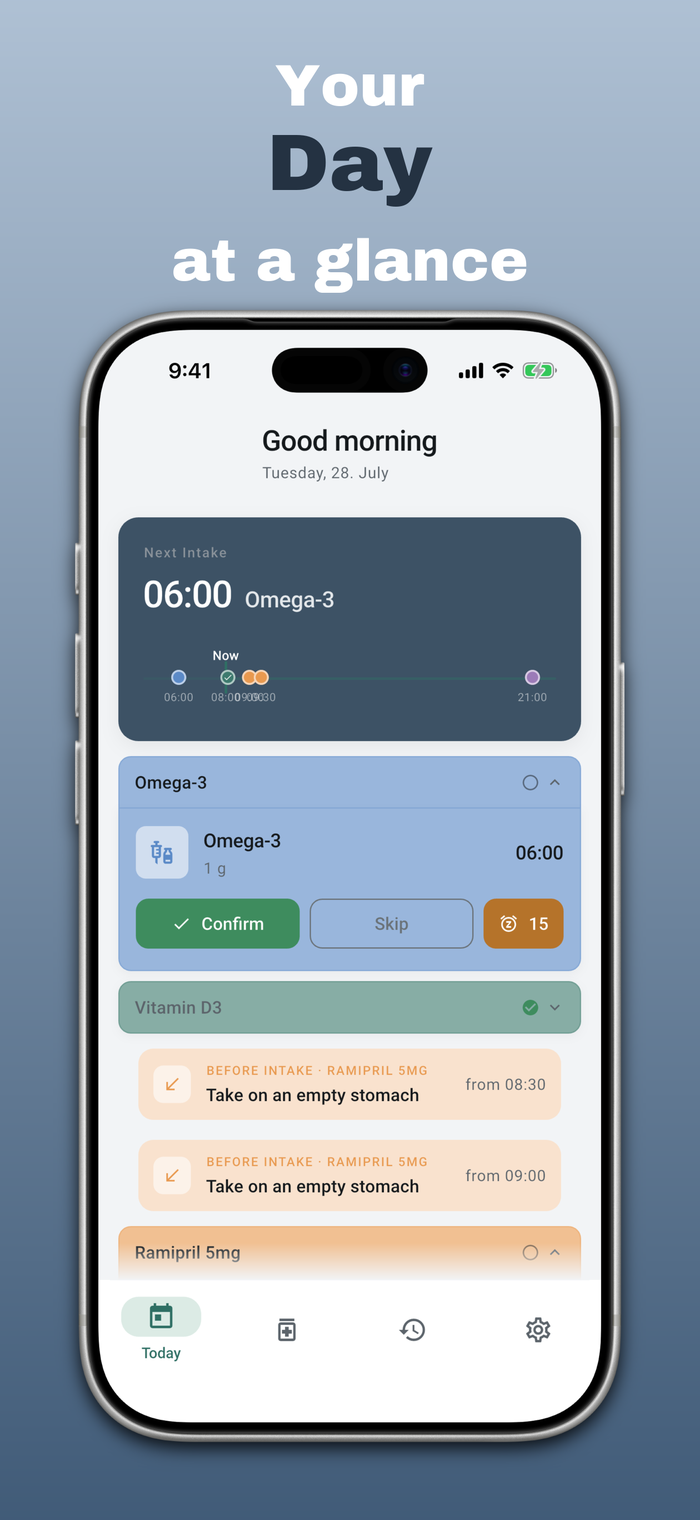
Your day, at a glance
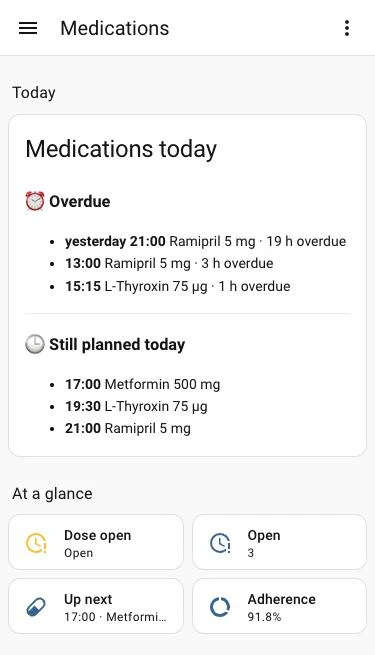
The Today view instantly shows what's due next — with a visual timeline across your whole day. One tap is enough to confirm, skip, or snooze an intake by 15 minutes.
- Your next dose always visible at the top
- Timeline shows completed and open intakes
- Quick actions: confirm, skip, snooze
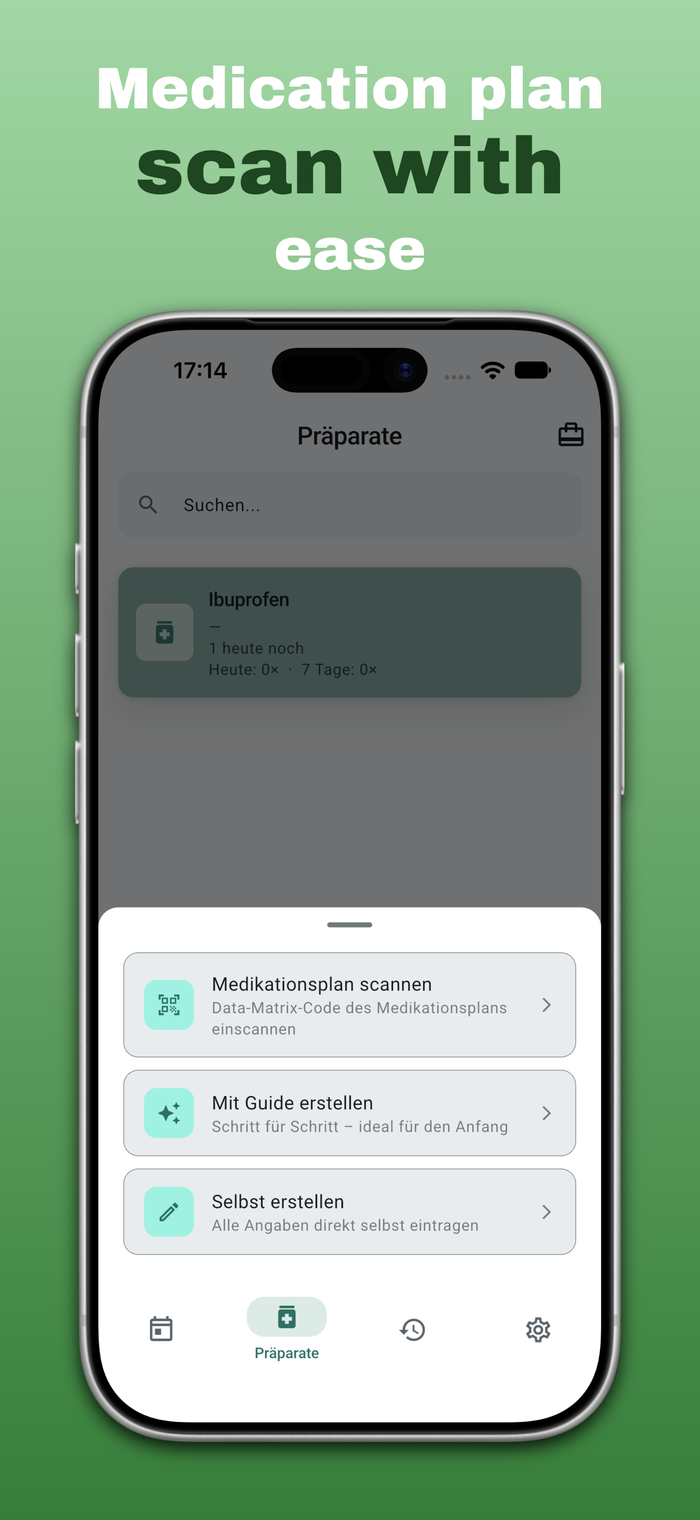
Scan your medication plan
No more manual typing: scan the Data Matrix code of your standardized medication plan (the German "Medikationsplan"), and every medication is added in seconds. Everything is shown for review before it's saved.
- Scan the Data Matrix code of your standardized medication plan
- Or use the guided step-by-step assistant for manual entry
- Or enter everything yourself, completely free-form
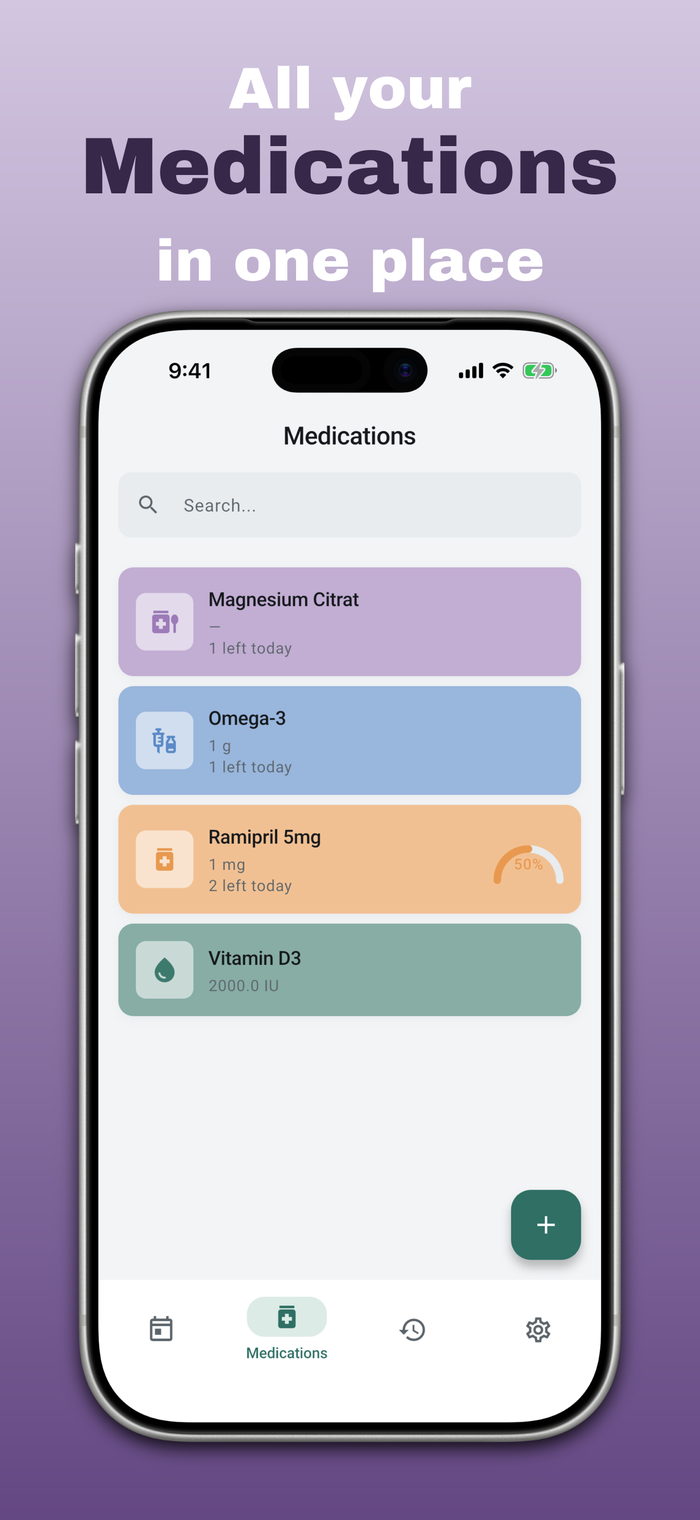
Every medication, organized
Tablets, drops, capsules, or injections — every medication gets its own card with dosage, remaining supply, and a distinct color for quick recognition.
- Any number of medications with individual dosing
- Supply indicator warns before a pack runs out
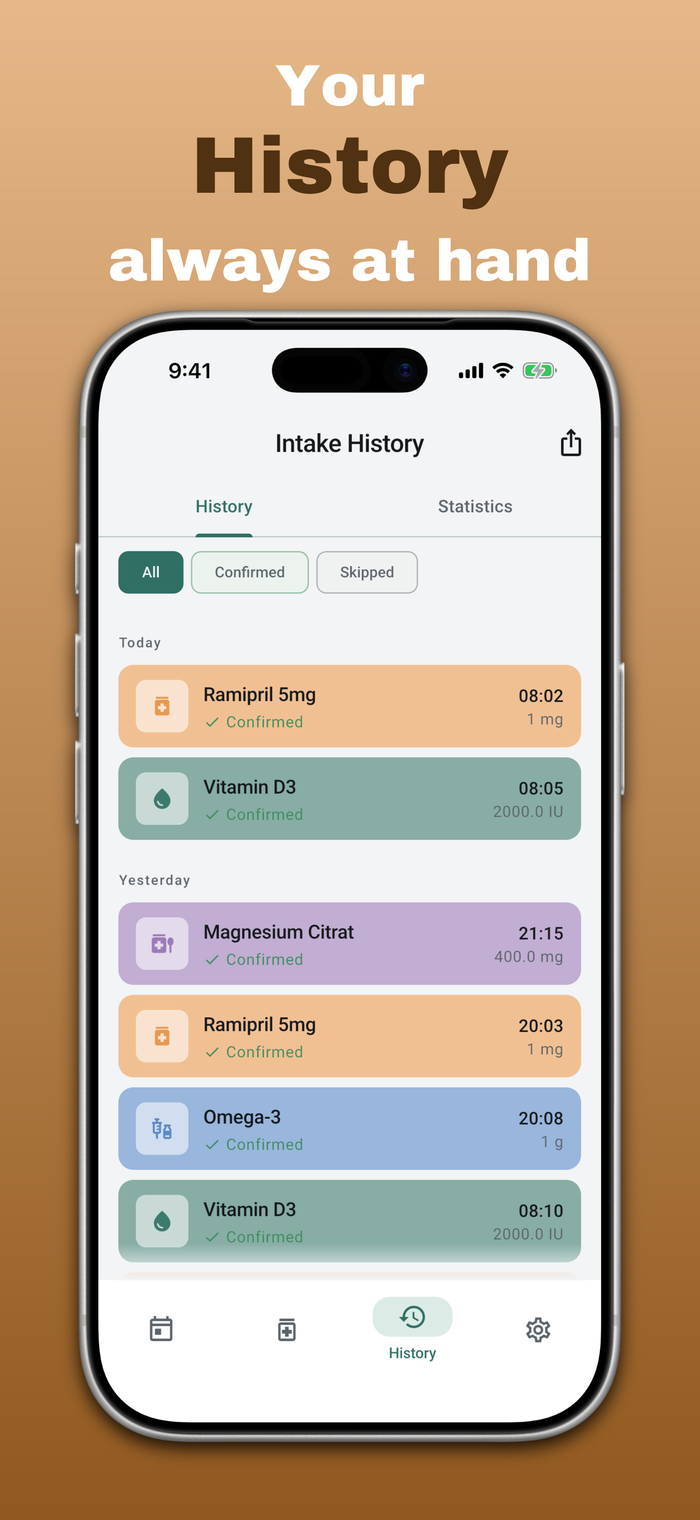
Your history, always at hand
Every intake is logged — taken or skipped. Perfect for giving your doctor a precise overview, or checking your own adherence as a statistic.
- Full history, filterable by medication and status
- Statistics view for adherence over time
- CSV & PDF export for doctor visits (Premium)
Features
Everything for a reliable routine.
CapsPlan bundles exactly the features a medication routine actually needs — without unnecessary bloat.
Scan your medication plan
Scan the Data Matrix code of your standardized medication plan — every medication is added in seconds instead of typing each one by hand.
Smart reminders
Push notifications right at intake time, with quick actions to confirm or snooze directly — no need to open the app.
Supply tracking
Keep an eye on how many tablets are left and add a new pack in seconds with “Refill”. Several strengths, splitting and reach: how it works.
Splitting tablets
Several strengths per medication, splittable into halves or quarters. CapsPlan suggests the right pieces for every dose and shows how long each strength lasts.
Minimum interval & daily max
Set the time between two doses and the maximum per day, also for as-needed medication. The card and the reminder wait until the next dose is allowed.
Weekly preview
What's coming up next week? Low supply, new dose steps, a different tablet strength. Any time on Today, and as a notification on Saturdays.
Completely private
All data stays on your device – or, if you want, in your own iCloud. No servers of ours, no tracking, no account required.
Home screen widgets
iOS: a ring gauge for your daily progress and a variant that hides medication names. Android: a widget to confirm or skip right on your home screen.
Apple Watch
Confirm or skip doses right on your watch with a swipe. Install the watch app once via the Watch app on your iPhone.
Siri
“Hey Siri, next dose in CapsPlan” — Siri tells you your next intake or confirms it by voice.
Live Activities
Your next dose on the lock screen and in the Dynamic Island, with a confirm button.
Tapering up and down
Reduce or increase a dose automatically in fixed steps — every few days, weeks or months — to 0 or to a target dose you choose. If your doctor changes the therapy, you can adjust the plan at any time.
Travel & timezones
Changed timezone? CapsPlan asks whether reminders should follow local time. Plus a travel supply calculator and quiet hours for follow-up reminders.
Correct your history
Edit or delete past intakes if something went wrong while confirming.
Multilingual
German, English, Spanish, Italian and Turkish — the app automatically adapts to your system language.
For iOS & Android
One app, every device — the same reliable experience on the App Store and Google Play.
Statistics & export Export: full version
Export your intake history as CSV or PDF and view your own adherence as a statistic — handy for your next doctor's visit.
Supply & tablets
A supply that does the math.
Many treatments are more than one tablet a day: doses change, tablets get split, and there are several strengths in the cupboard. CapsPlan keeps track so you don't have to calculate, and tells you in good time when you need a new prescription.
Several strengths
Add every strength of a medication you have at home, e.g. 10 mg and 5 mg. Each strength has its own stock and its own warning when it runs low.
Splitting, never finer than allowed
For each strength you set: not splittable, into halves or into quarters. Capsules are never split. A suggestion has at most six pieces, and the dose is always hit exactly.
The right suggestion
For every dose CapsPlan works out the right pieces. You decide what matters most, in your order: longest reach of your supply, fewest pieces or fewest splits.
Broken pieces first
If half a tablet is left after splitting, CapsPlan uses it first at the next dose that needs it. No leftover piece is forgotten in the pack.
Reach at a glance
For each strength you see a bar and the date your supply lasts until. The card on Today shows which pieces to take, and you can adjust them when confirming if you like.
Refill in seconds
New pack? Tap “Refill”, pick the pack size, done. You can also do it straight from the notification when supply runs low. Mistyped? One tap on “Undo”.
When tapering up or down
Every step put together correctly, right to the last day.
When tapering, the dose changes every few days or weeks, often in half tablets. That is exactly where CapsPlan helps most:
- No calculating: for every step it's clear which pieces you take, even when the dose changes in small steps.
- Will your supply last to the end? CapsPlan plans ahead across all steps and shows which strength runs out first, so you get the next prescription in time instead of running short in the middle of the plan.
- Reminder the evening before: if the split changes tomorrow, CapsPlan lets you know the evening before.
- Weekly preview: every Saturday you see which step begins and whether you need a different strength.
- Fewer splits, fewer leftovers: broken halves are used up first, and if you like, the suggestion keeps the number of splits as low as possible.
- Traceable: the CSV export lists the pieces you took for every dose, handy when talking to your doctor or pharmacist.
| Dose | Suggestion |
|---|---|
| 20 mg | 2 × 10 mg |
| 17.5 mg | 1 × 10 mg + 1½ × 5 mg |
| 15 mg | 1 × 10 mg + 1 × 5 mg |
| 12.5 mg | 1 × 10 mg + ½ × 5 mg |
| 10 mg | 1 × 10 mg |
| 7.5 mg | 1½ × 5 mg |
| 5 mg | 1 × 5 mg |
Highlighted: steps with half a tablet. A worked example, not a medical recommendation. Your doctor sets step size and interval; more in the guide to tapering.
Important: CapsPlan only makes a first suggestion for how the dose can be put together from your tablets and split. Whether and how a tablet may be split and how the dose is divided is always something to agree with your doctor or pharmacist.
iCloud sync & Home Assistant
On all your devices. And in your smart home.
If you like, CapsPlan syncs your medications and intakes across iPhone, iPad and Apple Watch through your own iCloud. And through it, Home Assistant can now read along: open doses, what's still due today and how long your supply lasts – for lights, announcements and reminders all over your home.
iCloud sync
Confirm a dose on your iPhone and seconds later it's ticked off on your iPad too. Optional, no account with us: the data lives only in your own iCloud. Switch it on under Settings → Backups.
iCloud backup per device
On top, every device keeps a backup of its data in your iCloud – the safety net if something gets deleted by mistake, and the easy way to a new iPhone.
Home Assistant
Every medication becomes a device: next dose, open doses, stock, supply in days and the current dose when tapering. Plus a calendar and a ready-made overview for your dashboard.
Free and open
The integration is free and open source. Home Assistant reads straight from your iCloud, read-only and with no server in between. Install it through HACS.
Ideas for your home
When a dose is due, the whole house knows.
A few examples you can set up in minutes:
- A light as a reminder: a lamp glows red while a dose is open and turns off as soon as you confirm it in CapsPlan.
- Family in the loop: if a dose is still open after 30 minutes, someone in the family gets a message.
- Reorder in time: when your supply only lasts ten more days, the prescription lands on your shopping list.
- Several people: everyone connects their own CapsPlan, the dashboard shows all of them together.
How it works
- Switch on iCloud sync in CapsPlan (Settings → Backups).
- Add the “CapsPlan” integration in Home Assistant through HACS.
- Sign in once with your Apple ID, paste the token – done.
Home Assistant is a trademark of the Open Home Foundation. The integration is a CapsPlan project, not an official Home Assistant product. Not a medical device – always rely on CapsPlan itself for your medication.
Privacy
Privacy isn't a feature. It's the foundation.
CapsPlan was built local-first from day one. All data — medications, intake times, history — lives in a local database on your device. Sync and backup only run if you switch them on, and then only through your own iCloud. There are no servers of ours that ever see your health data, and no account you need to create.
- No servers of ours – sync only if you want, through your own iCloud
- No advertising or analytics trackers
- Full control — deleting the app means your data is gone
FAQ
Frequently asked questions
The most common answers about CapsPlan — for anything else, visit the support page.
Will my reminders really arrive reliably?
Yes — as long as notifications are allowed under Settings → CapsPlan → Notifications and Do Not Disturb is off. All reminders are scheduled locally on the device, independent of any internet connection.
Can CapsPlan help with splitting tablets?
Yes. Under medication → Edit → Strengths & stock you add every strength you have and how far it can be split (not, into halves or quarters). CapsPlan suggests the right pieces for every dose, uses broken pieces first and shows how long each strength lasts, across every step of a taper. The suggestion is only a calculation aid: always agree splitting and dosing with your doctor or pharmacist.
What happens to my data when I switch phones?
On iPhone and iPad you can switch on an iCloud backup and iCloud sync under Settings → Backups. On the new device, restore the backup or switch sync on – your data is back. Both run only through your own iCloud. On Android, keep your data with a local backup that you move to the new device.
How do I restore my Premium purchase?
Tap Settings → Restore Purchase inside the app. Make sure you're signed in with the same Apple ID used for the original purchase.
Can I use CapsPlan for free?
Yes. For free, you can manage up to 2 medications, including reminders, medication management, medication-plan scanning, history, supply, statistics and iCloud sync. The full version unlocks unlimited medications and CSV/PDF export for your doctor — as a one-time purchase, no subscription.
Can I export my intakes, for example for my doctor?
Yes. In History, tap the share icon at the top and choose a doctor's report as PDF, the CSV event list (one row per intake, note or tapering event) or the CSV day matrix (one row per day, one column per medication). The export contains what History shows with your current filters. Export is a Premium feature. Structure, columns and an interactive example are on the export page. Export explained
How do I open the CapsPlan CSV file in Excel?
Don't double-click. In Excel choose Data → From Text/CSV, set the file origin to UTF-8 (65001) and the delimiter to comma. Otherwise umlauts and the characters ✓ ✗ ⏰ display wrongly. The event list starts with a short summary per medication, then a blank line and the actual table from the line "Datum,Uhrzeit,…". Numbers and Google Sheets detect UTF-8 on import. Export explained
What do I do if my doctor changes the dose or the therapy?
Open the medication and adjust the dose and intake times; reminders follow automatically. If a taper plan is running, change it in the plan itself: add phases, change step size or duration, switch direction or set the current dose. Intakes already documented stay unchanged in your history.
Does CapsPlan replace medical advice?
No. CapsPlan is an organizational aid for taking your medications. It does not replace medical advice — always consult a doctor or pharmacist about dosage or interaction questions.
Can I suggest a new feature?
Always welcome — just send an email to support@dxdotm-coding.com. Suggestions go directly into future development of the app.
How do I install CapsPlan on my Apple Watch?
CapsPlan isn't installed on the watch automatically. Open the Watch app on your iPhone, go to “My Watch”, scroll to “Available Apps” and tap Install next to CapsPlan. On the watch, swipe a dose right to confirm it or left to skip it.
What can I say to Siri about CapsPlan?
For example “Hey Siri, next dose in CapsPlan” to hear your next intake, or “Confirm my dose in CapsPlan” to confirm it by voice. It works on iPhone without opening the app.
Can CapsPlan plan tapering up or down?
Yes, both. When tapering down you reduce a dose step by step, to 0 or to a target dose. When tapering up you increase it step by step to the target dose. You set the start, step size and interval; CapsPlan calculates each dose and reminds you. If your doctor changes the therapy, you can adjust the plan at any time: add or change phases, switch direction, correct the start date and current dose, even with a different dose per time of day. Your doctor always determines the dosage. Tapering explained
Guides
Explained briefly.
Medication app without an account
Many medication apps require an account and keep health data in the cloud. CapsPlan works locally: no sign-up, no servers of ours, all data stays on your device (on iOS optionally backed up and synced through your own iCloud).
Planning a taper up or down in the app
If a medication is reduced or increased step by step (as directed by your doctor), you choose Taper down or Taper up and set start, step size and interval. CapsPlan calculates the daily dose, reminds you, and ends at the target dose. If the therapy changes, you adjust the plan at any time. Your doctor always determines the dosage.
Calculating your medication supply for a trip
Pick your travel dates — CapsPlan shows, per medication, how many tablets, drops or units to pack, so you have enough even if your trip runs late.
Ready to never miss a dose again?
Start for free, upgrade to Premium anytime.